Back to Blog
Network Management
October 15, 2025
502 views
Understanding DHCP Snooping and Why It’s Essential in Modern LANs
DHCP Snooping is a security feature that plays a critical role in protecting local area networks (LANs).
Commonly enabled on access or distribution switches, it acts as a barrier against rogue DHCP servers and ensures that clients receive legitimate IP addresses.
This article explains:
- What DHCP Snooping is
- Why it is essential in enterprise networks
- How to configure it correctly, with a practical Aruba CX example
What is DHCP Snooping?
- DHCP (Dynamic Host Configuration Protocol) allows devices to automatically obtain IP addresses and network parameters such as DNS and gateway.
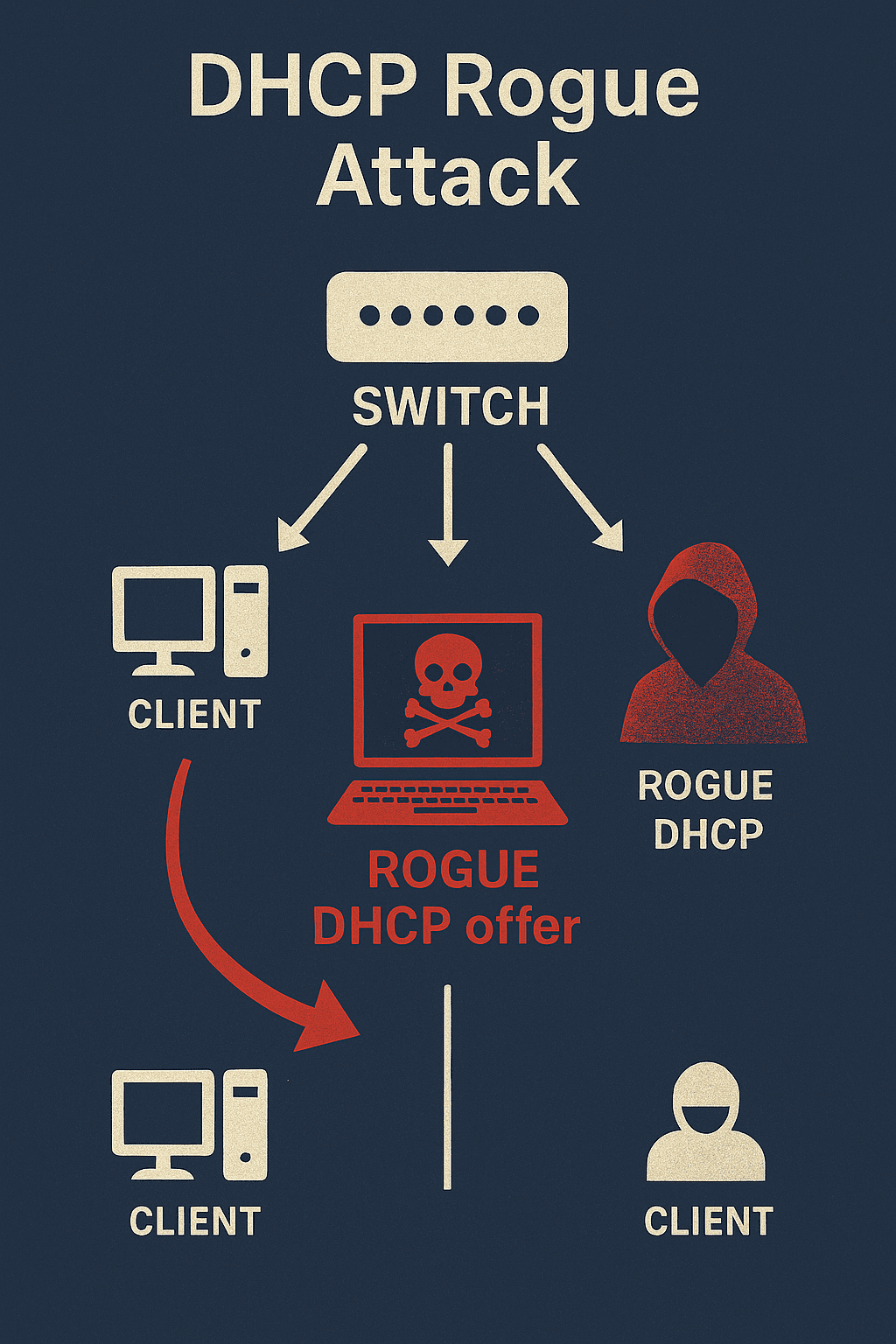
- In an unsecured network, any device can act as a DHCP server.
- A rogue DHCP server can hand out malicious IP configuration or gateway settings and thereby intercept or disrupt traffic.
- DHCP Snooping prevents that by filtering DHCP traffic at the switch level.
The Role of DHCP Snooping
- DHCP Snooping filters DHCP messages and classifies switch ports into two categories:
- Trusted ports
- Role: uplinks, routers, or ports connected to legitimate DHCP servers
- Behavior: allow all DHCP messages (DISCOVER, OFFER, REQUEST, ACK, etc.)
- Untrusted ports
- Role: client-facing access ports (PCs, printers, most Wi-Fi AP ports)
- Behavior: allow only client requests (DISCOVER, REQUEST); block server responses (OFFER, ACK)
- Any DHCP response received on an untrusted port is dropped, preventing unauthorized DHCP servers from assigning addresses.
A Brief History
- DHCP Snooping appeared in the early 2000s, first implemented on Cisco Catalyst switches.
- It was later adopted by other vendors (HP/Aruba, Juniper, etc.) and became a standard feature in enterprise switches.
- Today, most enterprise switches, including Aruba CX (AOS-CX), provide DHCP Snooping.
How DHCP Snooping Works
- When enabled, the switch monitors DHCP packets on configured VLANs.
- If a packet is seen on an untrusted port:
- The switch only allows DHCP DISCOVER and REQUEST messages from clients.
- DHCP OFFER and ACK messages from that port are dropped.
- The switch builds and maintains a binding database with entries that include:
- Client MAC address
- Assigned IP address
- VLAN ID
- Physical port
- The binding database is consumed by other protections such as:
- IP Source Guard
- Dynamic ARP Inspection (DAI)
Best Practices for Configuration
- Enable DHCP Snooping globally on the switch.
- Enable DHCP Snooping only on VLANs that actually use DHCP.
- Mark uplink ports and DHCP server ports as trusted.
- Keep access ports untrusted (default).
- Treat Wi-Fi AP trunk ports as untrusted in most setups (unless the AP provides DHCP).
- Never mark a random access port as trusted unless you are certain a legitimate DHCP server sits there.
- Persist the DHCP Snooping binding database if possible (to survive reboots).
Example: Configuring DHCP Snooping on Aruba CX (AOS-CX)
Below is a simple Aruba CX configuration example for VLAN 10 (users) and VLAN 20 (Wi-Fi):
bash
# Enable DHCP Snooping globally
switch(config)# dhcp-snooping
# Specify VLANs for DHCP Snooping
switch(config)# dhcp-snooping vlan 10,20
# Trust the uplink or DHCP server port
switch(config)# interface 1/1/48
switch(config-if)# dhcp-snooping trust
# Ensure access ports remain untrusted (default)
switch(config)# interface 1/1/1-1/1/24
switch(config-if-range)# no dhcp-snooping trust